
友情链接:
Contact us Chinese English Alibaba
DYLINK new technologyNational High-Tech Enterprise
Service Hotline0755 86120002


Service Hotline0755 86120002

分类:DVI KVM switch
描述:
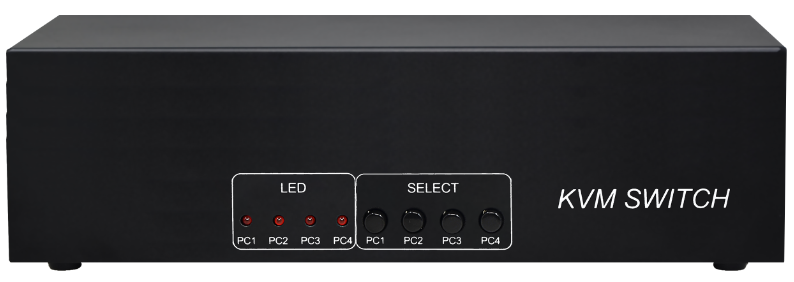
product descriptionDVIKVMMulti-Computer Switcher;1.This system enables users to swiftly switch between 2, 4, or 8 computer hosts using a single USB keyboard, mouse, and DVI video interface, allowing efficient multitasking.;2.The DVI KVM switch supports ultra HD video resolu0755 86120002

DVIKVM Multi-Computer Switcher;
1. This system enables users to swiftly switch between 2, 4, or 8 computer hosts using a single USB keyboard, mouse, and DVI video interface, allowing efficient multitasking.;
2. The DVI KVM switch supports ultra HD video resolution (1920*1200) and backward compatibility with other resolutions, enabling users to enjoy wider screen displays and optimal work performance.;
3. The DVI KVM switch supports seamless switching between 2, 4, or 8 computers, featuring a dual-port USB Hub and audio input/output interfaces. This enables rapid, seamless switching of USB keyboard/mouse data and audio through KVM cables. The USB Hub also grants each computer access to two additional USB2.0 peripherals.;
4. The device is easy to install and use. Simply plug the cable into the corresponding port. No software configuration is required, and there are no compatibility issues. It works on multiple operating systems, including Windows, Linux, and Mac.;
1. PC version: 8 DVI cables and 4 USB A/B cables,
2. User interface: Two monitors with DVI ports; a USB keyboard and mouse; two USB2.0 devices。
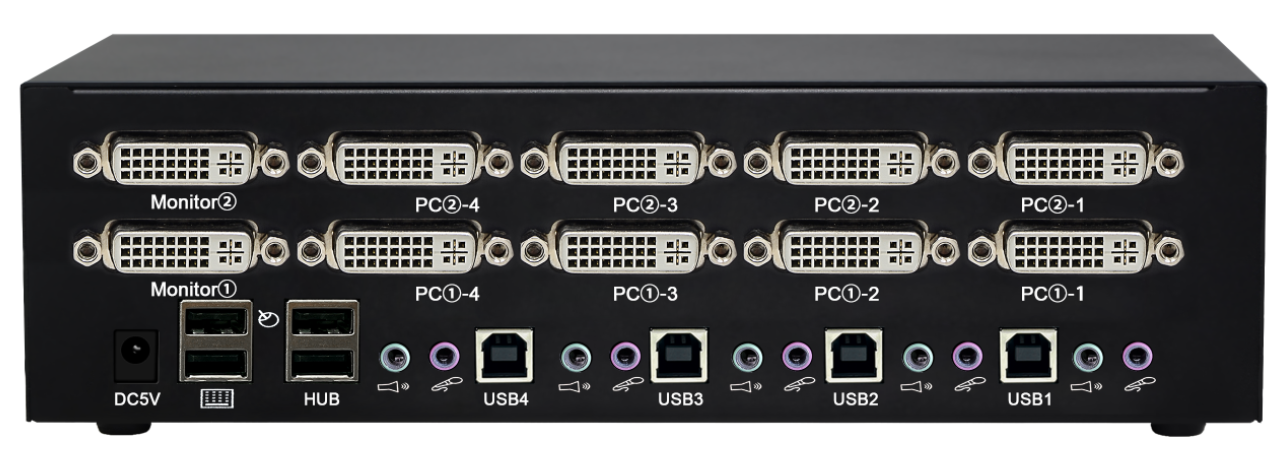
l Supports DVI1.0 standard with intelligent EDID functionality, featuring a single USB keyboard and mouse to control 2, 4, or 8 DVI computer hosts.;
l Built-in 2-port USB Hub, fully compatible with USB2.0;
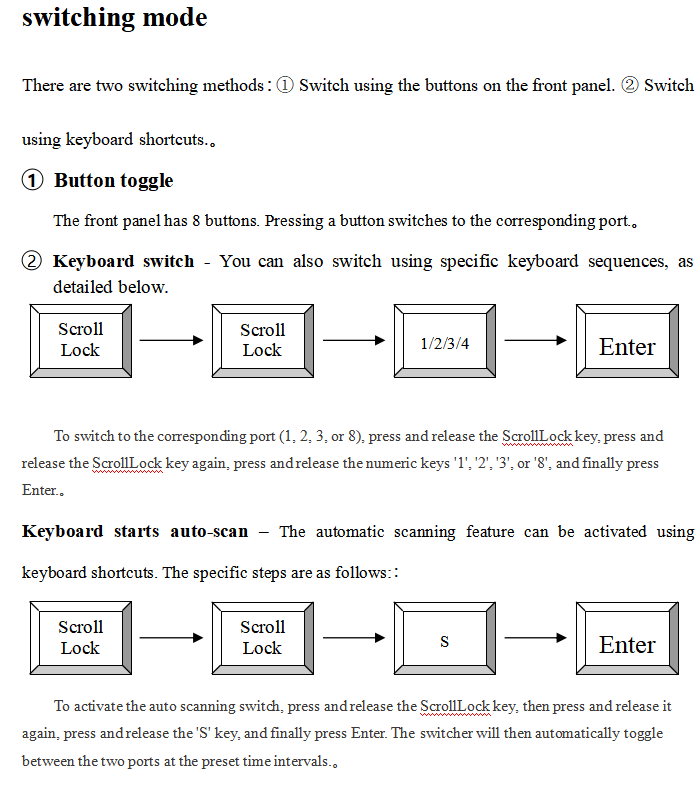
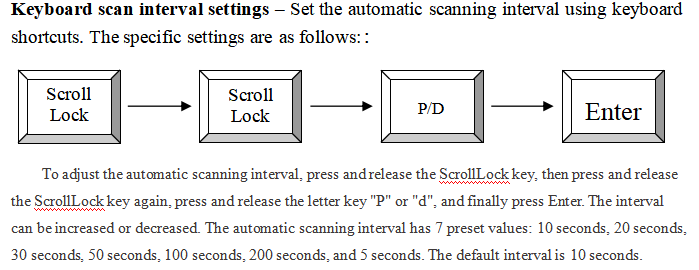
l Two flexible switching modes: front panel buttons and keyboard hotkeys;
l Supports up to 1920*1200@60Hz;
l The keyboard and mouse support port emulation and bypass functions, compatible with IBM, DELL, HP, and Double Fly Mouse/Keyboard.;
l Supports multiple platforms: Windows, Linux, and Mac;
container loading list
Thank you for using our products. Please open the packaging and first check the product packing list.
Product packing list:
√ KVM switch | once |
√ 12V/2APower adapter | once |
√ operating instructio | a part |
√ Warranty card certificate | One copy each |
1. Turn off the power for the switch, DVI monitor, and all hosts。
2. Insert the USB keyboard and USB mouse into the ports labeled as keyboard and mouse on the switch. If needed, you can also connect two USB2.0 universal peripherals to the ports labeled as USB Hub, such as a USB flash drive or USB camera。
3. Insert the DVI monitor into the switch port labeled "Monitor" and turn on the monitor power.。
4. Use a DVI cable to connect the DVI port on the switcher to the DVI port on the host.。
5. Connect the switcher's USB port to the host's USB port using a USB cable。
6. Power on the switch。
7. Turn on all computer power and start
8. If you need audio, you can also plug the audio microphone into the switcher。
specifications | |
Number of connected computers | 4 |
Computer connection port | 4xDVI female port; 4x USB Type B female port; |
Client connection port | Keyboard/mouse 2x USB Type A female ports; 2x USB2.0 Type A female ports; 1xDVI female port;; |
DVI standard | 1.0 |
Highest video resolution | 1920*1200@60Hz |
Panel key | 4 |
LED pilot lamp | 4 |
Port switching method | Keys and keyboard shortcuts; |
source | DC12V/1A |
working temperature | -40 ~ +55°C |
size | 245mm X 90mm X 45mm |
 DYLINK new technology
 0755 86120002
 liyj@dayapc.com
 13316531915
 West 2nd Floor, Building B, No. 91, Ma Hom South Road, Ma Hom Community, Xili Street, Nanshan District, Shenzhen
  公众号二维码
公众号二维码
业务主管
业务经理
业务经理
业务经理
售后