友情链接:
Contact us Chinese English Alibaba
DYLINK new technologyNational High-Tech Enterprise
Service Hotline0755 86120002


Service Hotline0755 86120002

分类:DPKVM Ethernet
描述:
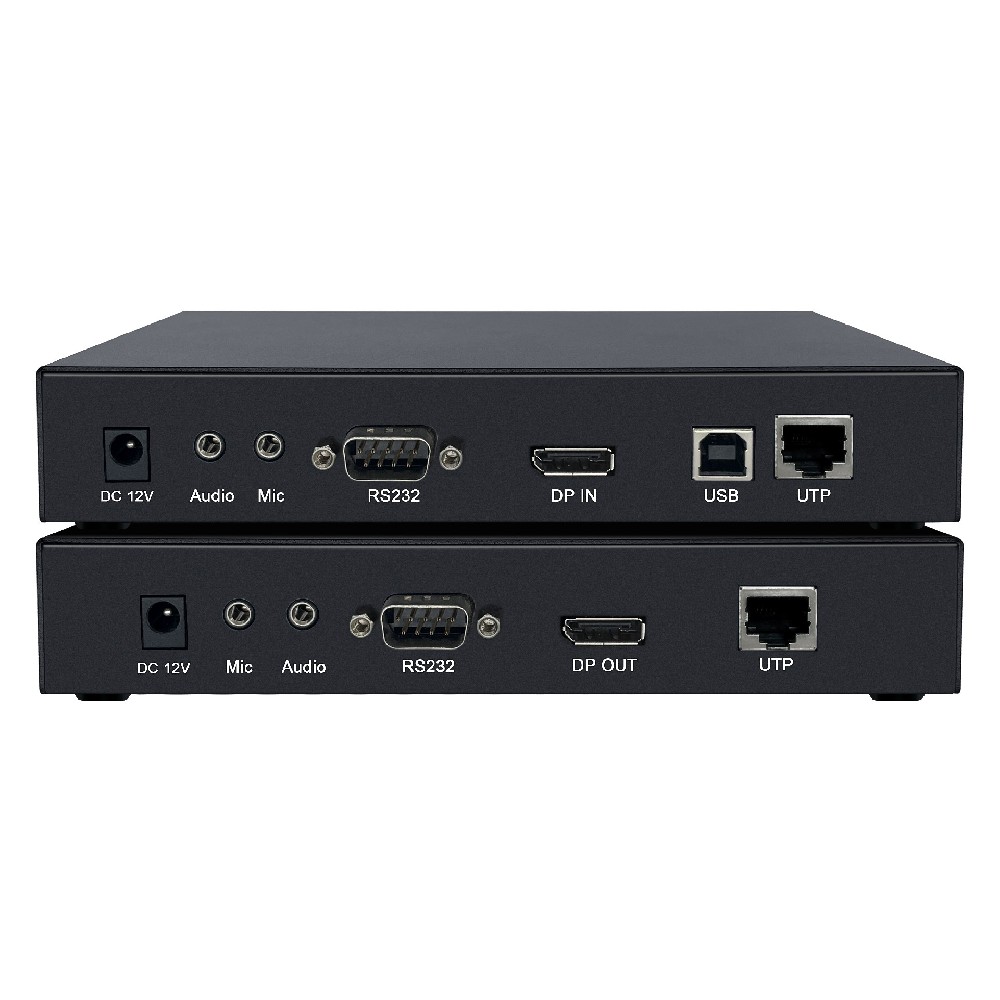
Product Overview4K KVM over IP High-Definition Video Encoder is a KVM video signal extender that connects via network cable with IP as the main medium. It adopts professional functions of over IP KVM solutions, allowing remote access to computer systems from USB control endpoints through the interna0755 86120002

4K KVM over IP High-Definition Video Encoder is a KVM video signal extender that connects via network cable with IP as the main medium. It adopts professional functions of over IP KVM solutions, allowing remote access to computer systems from USB control endpoints through the internal network.
1. A network ultra-high-definition video KVM extender that integrates DP video signals, USB keyboard and mouse control signals, USB 2.0 HUB functions (such as USB flash drives, U keys, printers, external hard drives, touchscreens), RS232 interface signals, bidirectional audio signals, and RJ45 network ports, all in a metal casing.
2. Using gigabit digital encoding technology, connect the device's local transmitting end to the computer host's DP video signal and USB control signals, and then connect them to the receiver of the extender via network cable. This can extend up to 150 meters, allowing users to operate the computer at the receiving end.。
3. Supports 4K x 2K image resolution (up to 3840 x 2160), providing an excellent image display. At the same time, it offers high-quality video quality with extremely low transmission latency. It can be widely applied in fields such as education, banking and securities, healthcare, and confidential office work.
Interface Schematic Diagram
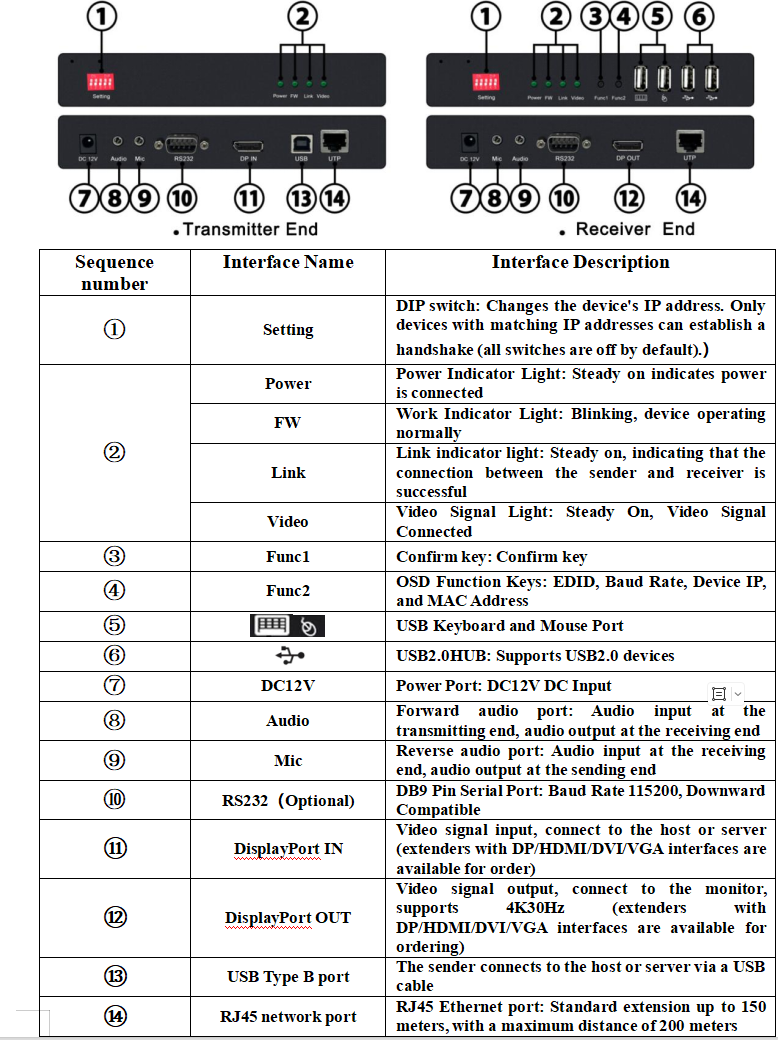
l It adopts gigabit digital encoding technology, resulting in clear and smooth images with minimal delay;
l Independent bidirectional audio transmission;
l DP Digital Audio and DP Audio Separation Function
l USB 2.0 HUB Function (USB devices such as USB flash drives, printers, wireless keyboards and mice, touchscreens, etc.);
l Transmits signals via RJ45 network port, with a maximum extension of 150 meters
l Hot-swappable design, plug-and-play;
l Supports 3840 x 2160@30Hz and is downward compatible with various common resolutions;
l Super strong 4 USB interface design, supporting the usage requirements of large-capacity USB devices;
l It can be connected through a switch or directly connected
l It can be mixed and matched, allowing the sender to connect with receivers with different video signal interfaces.
Product | Function |
Standard Edition | 4K+DP+4USB2.0+Audio |
Serial Port Version | 4K+DP+4USB2.0+Audio+ RS232 |
USB1.1Function | 4K+DP+2USB2.0+Audio+2USB1.1 |
Remote power on/off | 4K+DP+4USB2.0+Audio+Remote power on/off |
Thank you for using our company's products. When opening the package, please first check the product packing list.
Product Packing List:
√ KVM Extender Transmitter | One |
√ KVM Extender Receiver | One |
√ Video cable | One |
√ Audio cable | One |
√ USB A to B line | One |
√ 12V/2A power adapter | Two |
√Warranty Card Certificate of Conformity | One each |
1. First, confirm that the encoding of the DIP switches on the sender and receiver ends are consistent.
2. The sender connects to the controlled host using standard video cables, USB cables, and audio cables;
3. The receiving end is connected to a display, audio devices, USB keyboard and mouse, and USB devices;
4. The sender and receiver are connected via network cable (can pass through a switch);
5. Connect the power supply to both the transmitter and receiver.
6. The sender and receiver display the connection status through indicator lights;
7. Supports hot-swapping, allowing controlled devices to be added or removed at any time without needing to power off via KVM.
8. Cross-platform support, supporting mainstream operating systems such as Windows, Linux, and Sun.
Note: After changing the DIP switch settings, the device needs to be powered off and restarted.
Product | Function |
Standard Edition | 4K+DP+4USB2.0+Audio |
Serial Port Version | 4K+DP+4USB2.0+Audio+ RS232 |
USB1.1Function | 4K+DP+2USB2.0+Audio+2USB1.1 |
Remote power on/off | 4K+DP+4USB2.0+Audio+Remote power on/off |
Thank you for using our company's products. When opening the package, please first check the product packing list.
Product Packing List:
√ KVM Extender Transmitter | One |
√ KVM Extender Receiver | One |
√ Video cable | One |
√ Audio cable | One |
√ USB A to B line | One |
√ 12V/2A power adapter | Two |
√Warranty Card Certificate of Conformity | One each |
1. First, confirm that the encoding of the DIP switches on the sender and receiver ends are consistent.
2. The sender connects to the controlled host using standard video cables, USB cables, and audio cables;
3. The receiving end is connected to a display, audio devices, USB keyboard and mouse, and USB devices;
4. The sender and receiver are connected via network cable (can pass through a switch);
5. Connect the power supply to both the transmitter and receiver.
6. The sender and receiver display the connection status through indicator lights;
7. Supports hot-swapping, allowing controlled devices to be added or removed at any time without needing to power off via KVM.
8. Cross-platform support, supporting mainstream operating systems such as Windows, Linux, and Sun.
Note: After changing the DIP switch settings, the device needs to be powered off and restarted.
 DYLINK new technology
 0755 86120002
 liyj@dayapc.com
 13316531915
 West 2nd Floor, Building B, No. 91, Ma Hom South Road, Ma Hom Community, Xili Street, Nanshan District, Shenzhen
  公众号二维码
公众号二维码
业务主管
业务经理
业务经理
业务经理
售后